Description
Raspberry Pi Debug Probe: the official SWD and UART probe for Pico
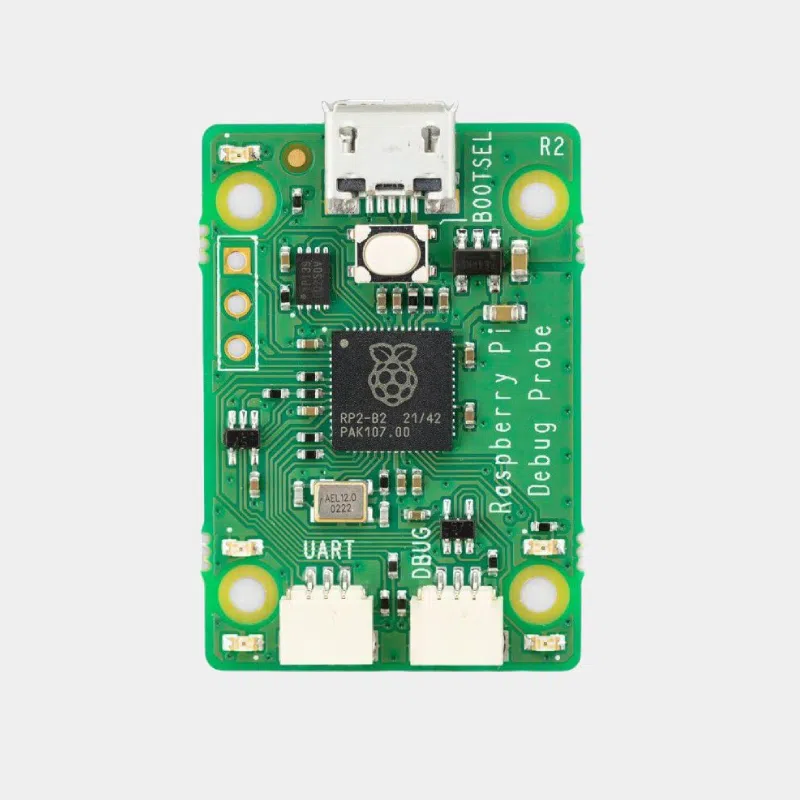
The Raspberry Pi Debug Probe is an all-in-one USB debugging kit: plug it into your computer, connect it to a Raspberry Pi Pico, and you can load your programs and debug them step by step, without soldering and without pressing the BOOTSEL button for every attempt. It provides both an Arm Serial Wire Debug (SWD) interface and a UART serial port, and works on Windows, macOS and Linux with OpenOCD and any CMSIS-DAP compatible tool.
Highlights
- Two functions in one : USB to SWD bridge and USB to UART bridge, usable simultaneously.
- CMSIS-DAP standard : compatible with OpenOCD, GDB and the Raspberry Pi Pico extension for VS Code.
- without soldering : three cables included for 3-pin JST SH connectors and 2.54 mm pitch pins.
- Open source firmware (debugprobe, formerly Picoprobe), updated like a Pico with a simple UF2 file.
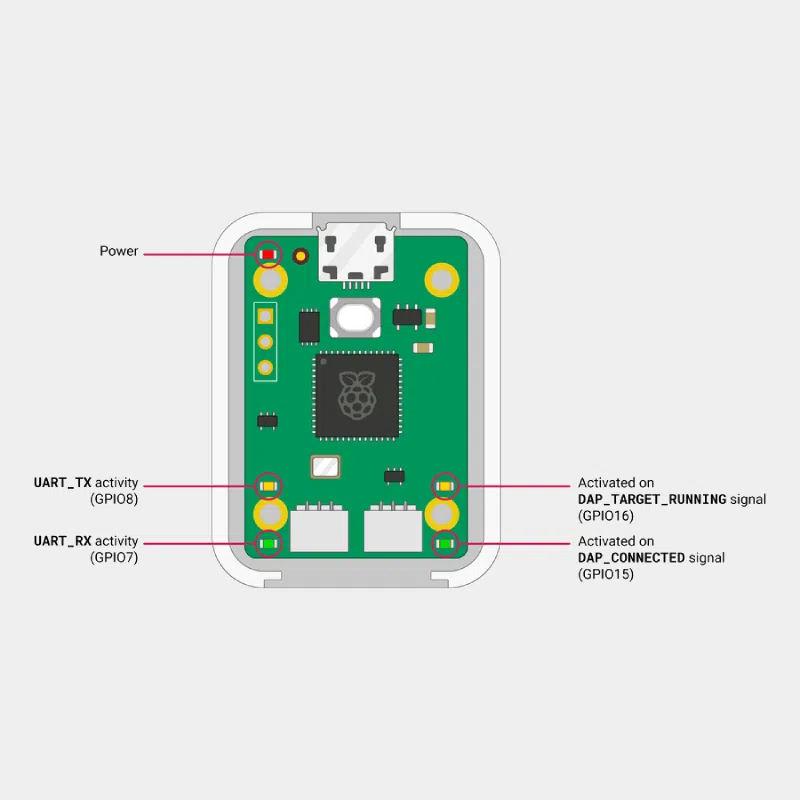
- Plastic case and five status LEDs: power and link activity.
- Beyond the Pico : usable with other Arm processors or as a simple 3.3 V USB-serial adapter.
Technical specifications
Kit contents
- Debug Probe in its plastic case
- USB cable
- 3-pin JST to 3-pin JST cable
- 3-pin JST to 2.54 mm female header cable
- 3-pin JST to 2.54 mm male header cable
Which one to choose? Debug Probe or a Pico programmed as a probe
The Debug Probe uses the same firmware as a Pico turned into a probe, but with a case, standardised connectors and colour-coded cables (orange for TX or SC, black for ground, yellow for RX or SD). Day to day, it avoids loose connections and saves valuable time.
Compatibility and pitfalls
- Pico H and Pico 2 with JST connector : direct connection to the D (debug) port with the JST to JST cable.
- Pico without JST connector : solder SWCLK, GND and SWDIO pins and use the cable with the female header.
- Raspberry Pi 5 : its 3-pin UART connector follows the same standard, handy for reading the serial console.
- Common ground : if the target has its own power supply, connect GND first to avoid damaging the probe.
- 3.3 V only : do not connect it directly to 5 V signals.
- Programs in Debug mode : compile your binaries in the Debug configuration to take full advantage of GDB.
Recommended accessories
- Raspberry Pi Pico 2 : RP2350 microcontroller to debug with the probe.
- Male-female jumper cables: to connect non-standard targets.
- Find the whole ecosystem in the Raspberry Pi Pico accessories.
Uses and projects
- C/C++ development with the Pico SDK : breakpoints, single-stepping, memory inspection.
- Embedded systems teaching : one reliable probe per lab workstation.
- Serial console of a Raspberry Pi 5 via its 3-pin UART connector, or of any 3.3 V board.
- Instrumented projects where you need to understand real-time behaviour.
Inspiration: what's new in the Raspberry Pi Pico 2 and a cardiography measurement project on Pico W.
Frequently asked questions
What is the difference between Picoprobe and the Debug Probe?
Picoprobe (now debugprobe) is the firmware. The Debug Probe is the official hardware that runs it, supplied in a case with its cables.
Does it work with the Raspberry Pi Pico 2?
Yes, it connects in the same way to the boards of the Pico family; use OpenOCD with the corresponding target configuration.
Is any special software required?
OpenOCD and GDB, integrated into the Raspberry Pi Pico extension for VS Code, or any CMSIS-DAP compatible tool.
Can it be used as a USB-serial adapter?
Yes, the U port provides a 3.3 V UART recognised as a serial port by the computer.
How do I update the firmware?
As on a Pico: in BOOTSEL mode, copy the debugprobe firmware UF2 file to the drive that appears.
Is it compatible with Windows and macOS?
Yes, as well as Linux and Raspberry Pi OS.
Order your Raspberry Pi Debug Probe on monraspberry.com : official, tested product, stock based in France, shipping within 24/48 h after receipt of payment, free pickup point delivery on orders from €200, returns possible within 14 days with return authorization, and payment by Visa, Mastercard, PayPal, Apple Pay or Google Pay.