CATEGORIES

4,45 € INCL. VAT
Write to us: we will tell you the restocking time or send you a quote, including for several units.
Reply within 24/48 h.
4,45 € INCL. VAT

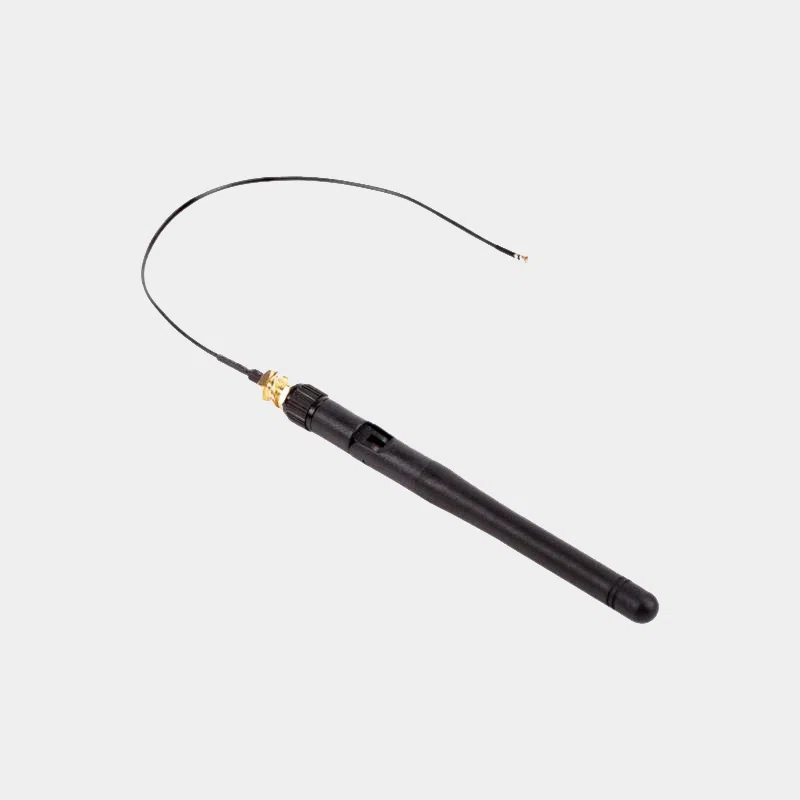
Inside a metal case, a Compute Module's built-in antenna loses most of its range: this is what the official CM4 antenna kit (CM4 Antenna Kit) fixes. The official Raspberry Pi antenna kit moves the antenna outside the case: a U.FL to SMA cable passes through the wall, and the dual-band omnidirectional antenna screws onto it. Above all, this kit is certified with the Raspberry Pi Compute Module 4 and the Compute Module 5 : a decisive advantage for bringing a product to market.
| Element | Features | Official value |
|---|---|---|
| Antenna | Model | YH2400-5800-SMA-108 |
| Antenna | Frequencies | 2400 to 2500 MHz and 5100 to 5800 MHz |
| Antenna | Gain / impedance / VSWR | 2 dBi / 50 Ω / ≤ 2.0 |
| Antenna | Polarisation / radiation | Vertical / omnidirectional |
| Antenna | Connector / dimensions | SMA female / 108 × 10 mm |
| Antenna | Temperature | -35 to +75 °C |
| Cable | Connectors | SMA male (antenna) to U.FL (module) |
| Cable | Length / range | 205 mm / 0 to 6 GHz |
| Cable | Temperature | -45 to +80 °C |
| Configuration | Antenna | Certification | Use cases |
|---|---|---|---|
| Compute Module + antenna kit (this product) | External, SMA, 2 dBi | Certified with CM4 / CM5 | Metal case, cabinet, commercial product |
| Compute Module alone | Built into the module | Certified | Plastic case, open-air board |
| Other off-the-shelf antenna | External | Certification to be redone by the integrator | Specific radio requirements |
Our advice : as soon as a Compute Module is enclosed in metal, or you are aiming to bring a product to market, choose this official kit rather than a generic antenna.
The dual-band SMA antenna and the 205 mm SMA to U.FL cable with hex nut, washer and toothed washer for panel mounting.
IoT gateway in an electrical cabinet, terminal in a steel enclosure, home router, commercial product requiring certification: read our guide to using a Raspberry Pi in a commercial product and our feature on Raspberry Pi in industry. The full range is in our Raspberry Pi Compute Module accessories.
Add dtparam=ant2 at the end of /boot/firmware/config.txt and reboot: the module switches to the U.FL connector.
Yes, it is certified for the Compute Module 4 and the Compute Module 5.
Yes, the antenna covers 2.4 GHz and 5 GHz with a gain of 2 dBi.
Because with another antenna, your product's radio certification must be redone and organised by the integrator. With this kit, it is already granted for the CM4 and the CM5.
No, the Raspberry Pi 4 has no U.FL connector: this kit is for Compute Modules only.
The documentation mentions a hole of about 6.4 mm to pass the SMA connector through the wall.
Order your official Raspberry Pi antenna kit on monraspberry.com : official, tested product, stock based in France, shipping within 24/48 h after receipt of payment, free pickup point delivery on orders from €200, returns possible within 14 days with return authorization, and payment by Visa, Mastercard, PayPal, Apple Pay or Google Pay.
| Accessory type | Antennas |
|---|