Description
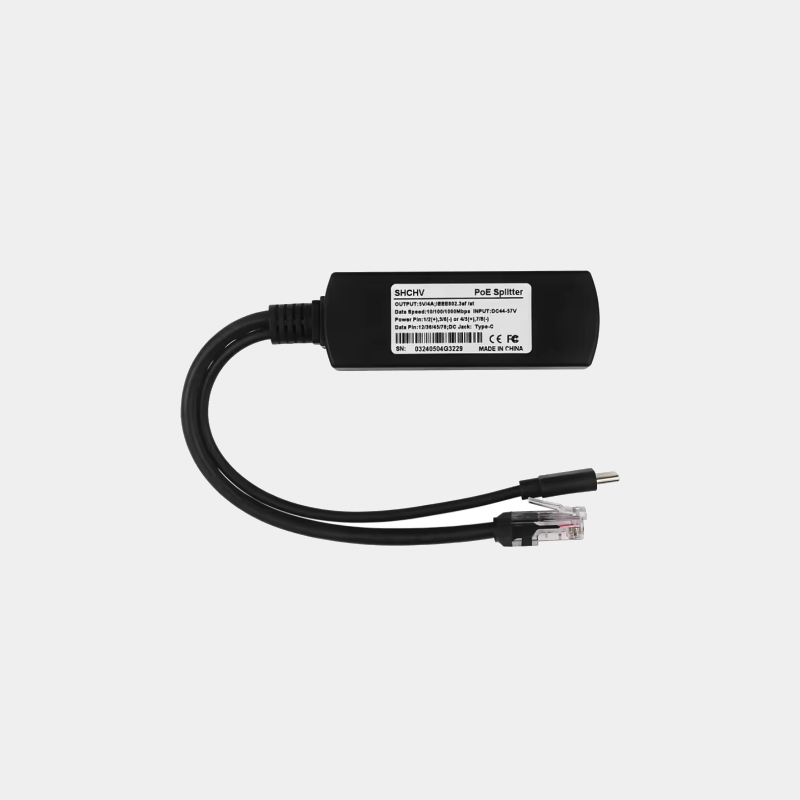
PoE Splitter USB-C 5V/4A: power and connect your Raspberry Pi 5 with a single Ethernet cable
The PoE Splitter USB-C 5V/4A is a compact, cost-effective Power over Ethernet splitter, designed specifically for the Raspberry Pi 5 and any device with a USB-C input. It lets you power your board and connect it to the network via a single RJ45 cable, using the PoE standard of your compatible switch or injector.
With its stable output 5V / 4A (20 W) via its USB-C, this splitter delivers the power needed to run a Raspberry Pi 5 even under sustained load (CPU, USB peripherals, NVMe, HAT accessories). Ideal for simplifying the cabling of your professional deployments, home automation projects or remote installations.
Why use a PoE splitter with a Raspberry Pi 5?
The Raspberry Pi 5 has no native PoE on its main board. The PoE Splitter solves this problem without adding a HAT and without occupying the GPIO header:
- A single Ethernet cable for power and network
- No extra mains socket needed near the Pi
- Simplified installation for IP cameras, digital signage, IoT sensors
- Ideal for ceiling, false-ceiling, outdoor or cabinet deployments
- Cost-effective solution vs a PoE+ HAT (~€9 instead of €25+)
Technical specifications
- Reference : SPL5V4
- Power output: 5V / 4A (20 W), USB-C connector
- Input: RJ45 PoE (compatible with PoE standards)
- Network output: RJ45 up to 100 Mbps
- Compatible: Raspberry Pi 5, Raspberry Pi 4 (via USB-C), and any 5V USB-C device
- Form factor: compact, no HAT to mount
Use cases
- Raspberry Pi surveillance cameras powered by the PoE switch
- Dynamic display / digital signage in shops and businesses
- IoT sensors and gateways in areas without a power outlet
- Interactive terminals, kiosks, information points
- Professional home automation, false-ceiling installations
- Deployment of Raspberry Pi fleets with a single central PoE switch
Simple installation in 3 steps
- Plug the RJ45 cable coming from your PoE switch or injector into the splitter input.
- Connect the splitter's RJ45 network output to your Raspberry Pi 5.
- Connect the splitter's USB-C cable to the Raspberry Pi 5 power port: you're ready to go.
Frequently asked questions (FAQ)
Is the PoE Splitter compatible with my switch?
Yes, as long as your switch or injector complies with a PoE standard. Simply check that your PoE source delivers enough power to supply 20 W on the splitter side (5V / 4A output).
Can I use it with a Raspberry Pi 4 or another device?
Yes. Any device accepting a 5V/4A (or lower) USB-C power supply can be powered with this splitter, provided your PoE switch supplies the required power.
What network speed is supported?
The splitter supports speeds up to 100 Mbps (Fast Ethernet). For office, IoT, signage and standard IP camera use, that is more than enough. For Gigabit, choose a Gigabit PoE+ HAT.
Does it need an additional HAT to work?
No. Unlike a PoE HAT that mounts on the GPIO, this splitter is external: it leaves the GPIO header completely free and does not add to the thickness of the Raspberry Pi.
Does the splitter get hot?
Slight warmth is normal during operation (48 V → 5 V conversion). Make sure there is good ventilation around the splitter, especially in a closed enclosure.