


In the same category...

Ollama Local AI Kit: private LLM server Raspberry Pi 5 16 GB + NVMe 512 GB
777,00 € INCL. VATIn stock
672,00 € – 936,00 €Price range: 672,00 € through 936,00 € INCL. VAT
Business, school or public body? business account Education offers
672,00 € – 936,00 €Price range: 672,00 € through 936,00 € INCL. VAT

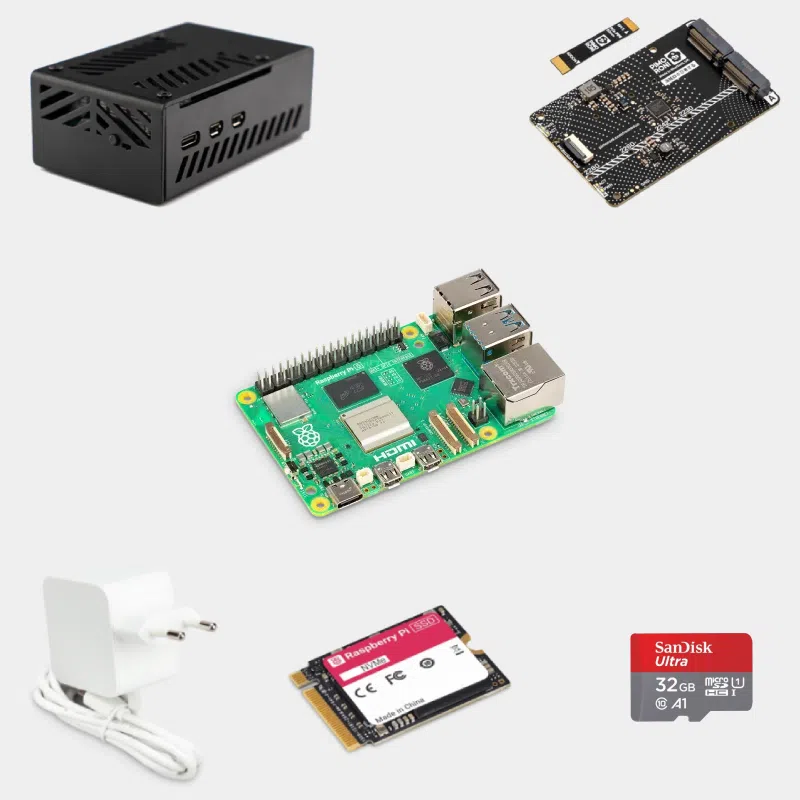
This Raspberry Pi 5 NAS kit brings together all the hardware to build your own file server: a Raspberry Pi 5 16 GB, an NVMe Base Duo with two official Raspberry Pi SSDs, a suitable case, the official 45 W power supply and a microSD card for the operating system. It is designed for individuals, families and small offices who want to centralize photos, documents and backups on a compact, quiet and energy-efficient device, while keeping control over the software.
| Features | Value |
|---|---|
| Card | Raspberry Pi 5 16 GB, Broadcom BCM2712 4-core Cortex-A76 at 2.4 GHz |
| Storage base | Pimoroni NVMe Base Duo: 2 M.2 M-key slots (2230 to 2280) behind a PCIe Gen 2 switch |
| SSD | 2 official Raspberry Pi M.2 2230 NVMe SSDs, 256 GB, 512 GB or 1 TB each |
| Drive throughput | About 450 MB/s in total, i.e. more than 220 MB/s per SSD with simultaneous access (shared bandwidth) |
| Network | Gigabit Ethernet, dual-band Wi-Fi 5 (802.11ac), Bluetooth 5.0 / BLE |
| USB | 2 x USB 3.0 and 2 x USB 2.0 |
| Video | 2 x micro-HDMI 4Kp60 |
| Power supply | Official Raspberry Pi 45 W USB-C Power Delivery |
| Operating system | SanDisk Ultra 32 GB microSD card included, supplied blank with no operating system |
| Assembly | To be assembled and configured yourself |
Find our other ready-to-assemble servers in the kits for media, and the full Raspberry Pi 5 range.
OpenMediaVault is the most widely used for a NAS: web interface, shares, software RAID and plugins. Raspberry Pi OS with Samba suits users who are comfortable with the command line, and CasaOS suits those who mainly want to install applications in a few clicks.
Yes, but the Raspberry Pi 4 does not expose a PCIe port: drives are connected via USB 3.0. The Pi 5 lets you connect NVMe SSDs over PCIe, which simplifies assembly and gives a more compact setup.
Yes, in software: OpenMediaVault or mdadm create a mirror between the two SSDs. You can also choose RAID 0 for capacity and speed, or two independent volumes.
No. You assemble it and install the operating system yourself, which leaves you free to choose the software that suits you.
Order with confidence : shipped within 24/48 h after receipt of payment from our stock based in France, free pickup point delivery on orders of €200 or more, official and tested products, returns within 14 days with return authorization. Payment by Visa, Mastercard, PayPal, Apple Pay or Google Pay.
| Storage | 2x 256GB, 2x 512GB, 2x 1TB |
|---|