
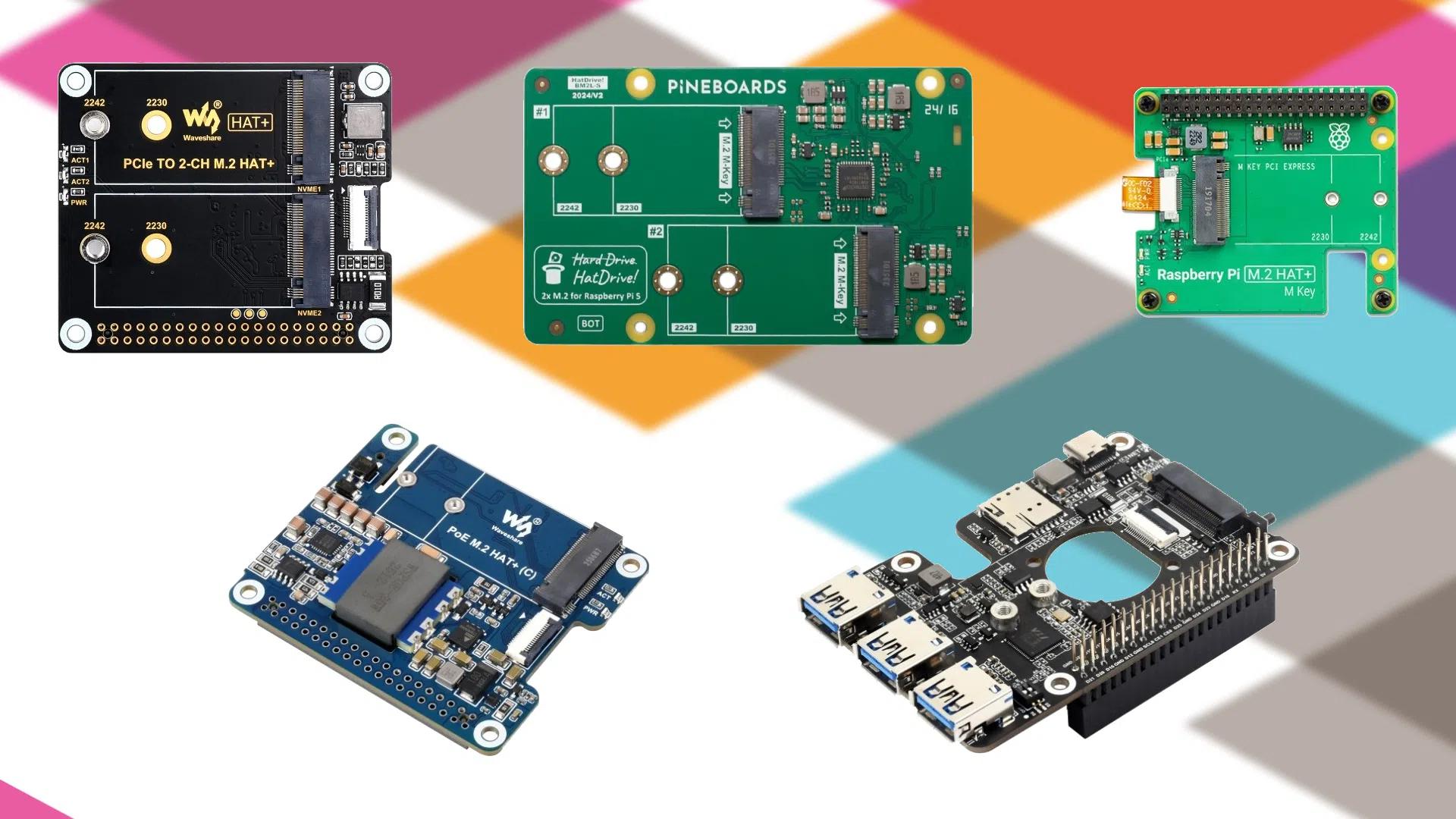
The best M.2 HATs for Raspberry Pi 5: NVMe storage, PoE and 4G/5G
Why an M.2 HAT on a Raspberry Pi 5?
The Raspberry Pi 5 (finally) opens up its PCIe bus: as a result, you can replace the microSD with an SSD NVMe for much faster I/O, or add expansions for network/USB/4G/5G, while keeping a compact form factor. An M.2 HAT gives you:
- Faster boot and load times (OS, containers, databases).
- More reliability than a microSD under heavy use (logs, builds, DB).
- Professional uses : mini NAS, IoT gateway, embedded server, video surveillance, home automation hub.
To move your Raspberry Pi 5 to an SSD: the HAT+ M.2 for Raspberry Pi 5 (official) takes a 2230 or 2242 NVMe SSD (up to 500 MB/s over PCIe 2.0). Prefer a ready-assembled set? The Raspberry Pi 5 with NVMe SSD comes with the official SSD installed and Raspberry Pi OS pre-flashed, in stock and shipped within 24/48 h from France.
Our selection (in stock at MonRaspberry): which HAT for which use?
1) PCIe → M.2 adapter with PoE for Raspberry Pi 5
The all-in-one network + storage solution : a single Ethernet cable to power your Pi (PoE) and network it, while enjoying an SSD NVMe.
Who is it for? Installers and rack/network projects that want a tidy cabinet without power strips.
Buy: PCIe to M.2 adapter with PoE
Good to know: PoE+ (802.3at) gives more headroom if you add a power-hungry SSD or demanding USB peripherals.
2) PCIe → M.2 expansion board 4G/5G + USB 3.2
The "advanced connectivity" board : you combine NVMe storage and cellular modem (4G/5G), plus USB 3.2 ports for your accessories.
Who is it for? Projects in IoT, edge computing and off-grid deployments (standalone camera, LoRa/5G gateway, connected kiosk)..
Buy: PCIe → M.2 4G/5G & USB 3.2 board
Good to know: M.2 4G/5G modems generally use a radio profile (antennas) and a slot SIM ; check the carrier and the band supported by your module before buying.
3) M.2 HAT+ for Raspberry Pi 5 (classic)
The best price/upgrade ratio : you add an NVMe M-Key directly to the Pi's PCIe via the supplied ribbon cable. Ideal to boost your OS and apps without complicating the architecture.
Who is it for? Everyone: desktop Pi, Home Assistant, Docker, media-server.
Buy: HAT+ M.2 for Raspberry Pi 5
Good to know: prefer NVMe SSDs (no SATA in M.2), and 2230/2242 formats if you want to stay compact and limit heat.
4) PCIe → dual M.2 HAT for Raspberry Pi 5
Two NVMe drives on a single Pi to separate OS/data, run software RAID, or add more drives (cache, ZFS, logs).
Who is it for? Mini-NAS, VM/containers, databases, devops lab.
Buy: PCIe → dual M.2 HAT for Raspberry Pi 5
Good to know: on the Pi 5, a single PCIe lane is shared: the bandwidth is split between two SSDs, but for a personal NAS or multitasking, the functional gain (capacity, separation of roles) is huge.
5) Pineboards Dual NVMe for Raspberry Pi 5
The "dual NVMe" benchmark very well finished for the Pi 5, with an switch PCIe ASMedia ASM1182e to split the lane across 2 slots M-Key (NVMe).
Who is it for? Demanding tinkerers who want two NVMe drives well integrated for a clean and efficient setup.
Buy: Dual NVMe Pineboards for Raspberry Pi 5
Quick comparison table
| Product | Strength #1 | Strength #2 | Key ports/formats |
|---|---|---|---|
| M.2 adapter with PoE | Power over Ethernet | NVMe M-Key | PoE 802.3af/at + NVMe |
| PCIe → M.2 4G/5G + USB 3.2 | Cellular modem | Hub USB 3.2 (×3) | SIM + NVMe |
| M.2 HAT+ (classic) | Upgrade simple | Minimal cost | M-Key via PCIe (nappe) |
| Dual M.2 (HAT PCIe) | 2× NVMe | RAID/Volumes séparés | Switch PCIe, 2230/2242/2280 |
| Pineboards Dual NVMe | Polished finish | Switch ASM1182e | 2× NVMe 2230/2242 |
Choosing well: 5 questions to avoid mistakes
- Your main use?
- OS + applis → M.2 HAT+ (simple, effective).
- NAS/volumes séparés → Dual M.2 or Pineboards Dual.
- Edge IoT / Off-grid → 4G/5G board + USB 3.2.
- Tidy network rack → M.2 with PoE.
- M.2 form factors : need 2280 ? Go for the Dual M.2 compatible with 2230/2242/2280. Otherwise, 2230/2242 are enough and run cooler.
- Thermal : an NVMe drive can run hot. Plan for pads/heatsink and a case compatible with the M.2 HAT (we offer suitable cases in this category).
- Power supply : for power-hungry setups (dual NVMe + USB), aim for PoE+ or a beefy USB-C power supply to avoid throttling.
- Connectivity : needAdditional USB and Cellular ? The 4G/5G board with 3× USB 3.2 is unmatched if you want a hub built in on top of the NVMe.
Installation tips (pro)
- PCIe cable : avoid twisting it; route the ribbon cable neatly to limit electrical noise.
- Mounting : use the standoffs provided so the SSD sits flat (better heat dissipation).
- NVMe SSD only : don't mix with M.2 SATA (same form factor, different protocol).
- Two NVMe drives : keep in mind that the PCIe lane is shared: perfect for separating roles/capacities, less so for ultra-sustained sequential workloads.
- Thermal : a thermal pad between the SSD and the plate/case brings the temperature down sharply under load.
- Cellular network : check band compatibility (carrier) and plan the placement of the Antenna (case, distance).
Real-world use cases (with the right HAT)
- Quiet mini NAS
- Dual M.2 or Pineboards Dual to separate OS / data or run software RAID.
- Ventilated case + thermal pads.
- IoT/Edge gateway
- 4G/5G board + USB 3.2 : NVMe storage + cellular connectivity + USB ports for sensors/cameras.
- Tidy network rack (PoE)
- M.2 with PoE : a single RJ45 patch cable for power and network, perfect for enclosures.
- Desktop Pi / Dev
- M.2 HAT+ : OS on NVMe, low latency, faster builds.
FAQ express
Can I boot from NVMe?
Yes, the Pi 5 supports running the OS on NVMe with the appropriate HAT/extension (with up-to-date firmware/bootloader). Choose a reliable NVMe drive (decent TBW).
NVMe 2230, 2242 or 2280?
- 2230/2242 : compact, run cooler, perfect for HATs.
- 2280 : often higher capacity; available on the dual M.2 HAT.
What if I want two drives + USB + modem?
Prioritize the critical use. For 2 drives, prends Dual M.2 / Pineboards ; for USB + 4G/5G, go for the 4G/5G + USB 3.2 board.
